
Price2Spy vs PriceZag: What Do You Really Get?
Compare Price2Spy and PriceZag on protected websites, screenshots, repricing, API access and feature fees. See why testing the same URLs matters.
At PriceZag, we regularly see new customers import spreadsheets with Price2Spy in their filenames. Price2Spy is based in Belgrade, Serbia. PriceZag has been based in Santa Monica, California, USA, since 2016. Both services monitor competing stores, but the differences become much clearer when you use them.
If you're considering Price2Spy, or already using it, here's our advice: put the same product URLs in both trials and compare the results. Especially the websites you actually need to monitor, not just the easy ones. PriceZag's 14-day trial needs no credit card.
See the difference on your own competitors.
Use the same URLs in Price2Spy and PriceZag. Compare the prices found, stock information, screenshots and the tools available afterward.
PriceZag includes screenshots on every visit and advanced repricing without separate feature fees. Price2Spy sells these as extra modules.
The real test: websites that are difficult to monitor
Most price trackers can read a straightforward product page. The hard part is getting consistent data from stores that use JavaScript, location-dependent prices, Cloudflare and other anti-bot systems.
Price2Spy advertises anti-bot monitoring through its Stealth IP technology, with additional traffic fees in some cases. PriceZag takes a different approach: full graphical browsers running on our own hardware with diversified GPUs and thousands of IP addresses worldwide, with no extra charge for monitoring protected websites.
There's a reason we see so many new customers importing their Price2Spy spreadsheets into PriceZag. Test both services on the same demanding websites and see the difference for yourself. What matters is which pages get monitored and how useful the results are.
Screenshots: a number is not the whole story
Price2Spy offers screenshot capture as a separately priced module. Its published description focuses on screenshots taken when a price change or a selected violation occurs.
PriceZag captures a screenshot at every monitoring attempt, not only when a price changes. We keep a history of these images for about a month, already included in your plan. You can inspect the page our browser saw, check an unexpected price, or look back after a retailer has changed its offer.
For retailers, that's a practical way to verify price and stock information. For brands and distributors, saved pages can also help document possible Minimum Advertised Price (MAP) violations. Screenshots aren't an occasional extra: they're part of how PriceZag makes monitoring data verifiable.
Price2Spy: one extra fee after another
Price2Spy separates its monitoring subscription from paid modules such as repricing and screenshots. It also lists additional charges for certain anti-bot traffic, extra users and additional automated reports. Its API is part of the Premium offering or a customized arrangement.
At PriceZag, repricing, screenshots, email and SMS alerts, Excel reports and multi-user permissions are all included with the monitoring membership. Our JSON API is the only optional paid addition. Protected sites don't trigger a separate traffic bill.
We're not claiming to be the cheapest basic monitoring subscription. We believe the better question is what you actually get when you need more than basic monitoring. A low entry price becomes less interesting when useful functions are spread across separately priced modules.
Price2Spy vs PriceZag: feature comparison
| PriceZag | Price2Spy | |
|---|---|---|
| Headquarters | Santa Monica, California, USA Since 2016 | Belgrade, Serbia |
| Difficult websites | Real graphical browsers on our own hardware, diversified GPUs and thousands of worldwide IPs. No extra fees for protected sites. | Vague "Stealth IP technology" claims; additional usage-based traffic fees. |
| Screenshots | Every monitoring attempt, with roughly one month of history. Included. | Optional paid module; capture based on specified price-change or violation events. |
| Repricing | Advanced custom rules and per-product comparisons of calculated rule outcomes. Included. | Basic rule-based repricing available as a separately priced module. |
| API | Broad JSON API covering most dashboard operations, including repricing rules and exports. Optional. | Published API mainly covers products, URLs and pricing data; Premium or custom arrangement. |
| Reports & team access | Customizable Excel/CSV exports, scheduled reports and multi-user permissions included. | Report and user allowances vary by tier; additional amounts available at extra cost. |
| Price checks | 5 times daily across plans. | As little as 1 check/day on Starter; up to 8/day only on the custom-priced Premium tier. |
| MAP monitoring | Yes, with screenshot history and alerts. | Available in eligible plans, with extra fees for screenshots. |
| Estimated competitor sales | Estimated units and revenue when numerical inventory data permits. | No. |
Stop comparing promises. Compare real results.
Run the same URLs in both services and inspect the data, screenshots and included features.
An API should do more than return prices
Price2Spy has a basic API. It mainly covers managing products and competitor URLs and retrieving pricing data. That covers common integration needs, but it isn't the same as controlling nearly the entire pricing workflow programmatically.
PriceZag's JSON API exposes most of what customers can do in the dashboard: manage products and competitor URLs, work with repricing rules and calculated amounts, retrieve monitoring information and history, access screenshot data, and request spreadsheet exports. It supports custom workflows rather than limiting developers to a feed of current competitor prices.
If your business uses a custom ecommerce platform, or wants to integrate pricing data with other internal systems, compare the actual API operations you need. A long feature list isn't a substitute for being able to automate the work.
Repricing: try our rule editor, not just a feature checkbox
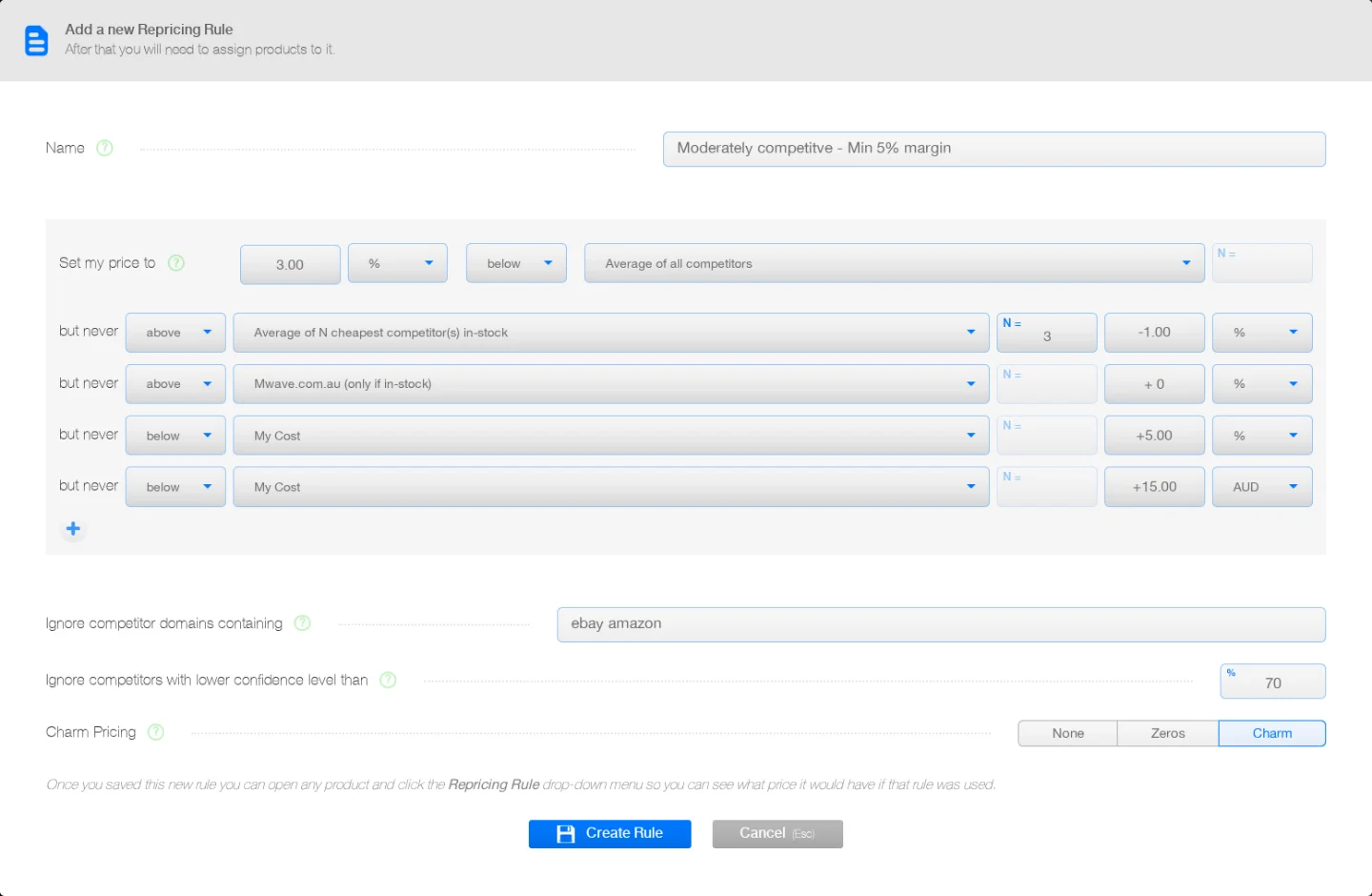
Both services offer rule-based repricing. But the detail matters. PriceZag lets you build pricing conditions using competitor prices, stock availability, your own cost, minimum amounts, other limits and price rounding. You can see what every available repricing rule would calculate for a product before choosing which one to apply.
That makes it possible to compare strategies without experimenting with live selling prices. You might follow the lowest in-stock competitor for one category, yet raise prices on another when competing stores sell out. PriceZag's repricing tools handle those decisions with rules you control.
The everyday monitoring tools still matter
PriceZag's price and stock history, email and SMS alerts, scheduled Excel reports, screenshots and MAP monitoring work together. You can monitor competing sellers without enabling repricing at all.
There's also competitor sales estimation: when a retailer exposes numerical inventory levels, PriceZag can estimate units sold and revenue from changes in that inventory. It's a useful extra, not a replacement for reliable price and stock monitoring.
Already using Price2Spy? Or choosing your first tracker?
Don't switch on promises alone. Import a small set of the same products and competitor URLs into both services. Include a few difficult websites and products with changing stock. Then compare:
- Data: Were prices and stock detected correctly and consistently?
- Evidence: Can you inspect the actual pages behind the readings?
- Control: Can you create the alerts, reports, repricing rules and API workflows you want?
- Total package: Which of those capabilities are included, and which cost extra?
PriceZag is built for people who care about what gets monitored, what they can verify, and what they can do with the results. The easiest way to decide is to test it against Price2Spy on your own websites.
This comparison was prepared by PriceZag in October 2026. Product features and pricing may change.