
Competitor price and stock alerts you can act on
Get notified when competitors lower prices, run out of stock, or create opportunities to increase your margins. PriceZag checks their pages 5 times a day and includes screenshots so you can verify what changed.
- Screenshots included
- 5 checks daily
- Works on protected websites
- Unlimited email recipients
A competitor drops their price while you're busy running your store. Another runs out of stock, leaving you an opportunity to raise yours. Missing either change can cost you sales or profit. PriceZag sends the important moves straight to your inbox, so you can respond when it matters instead of constantly checking competing websites.
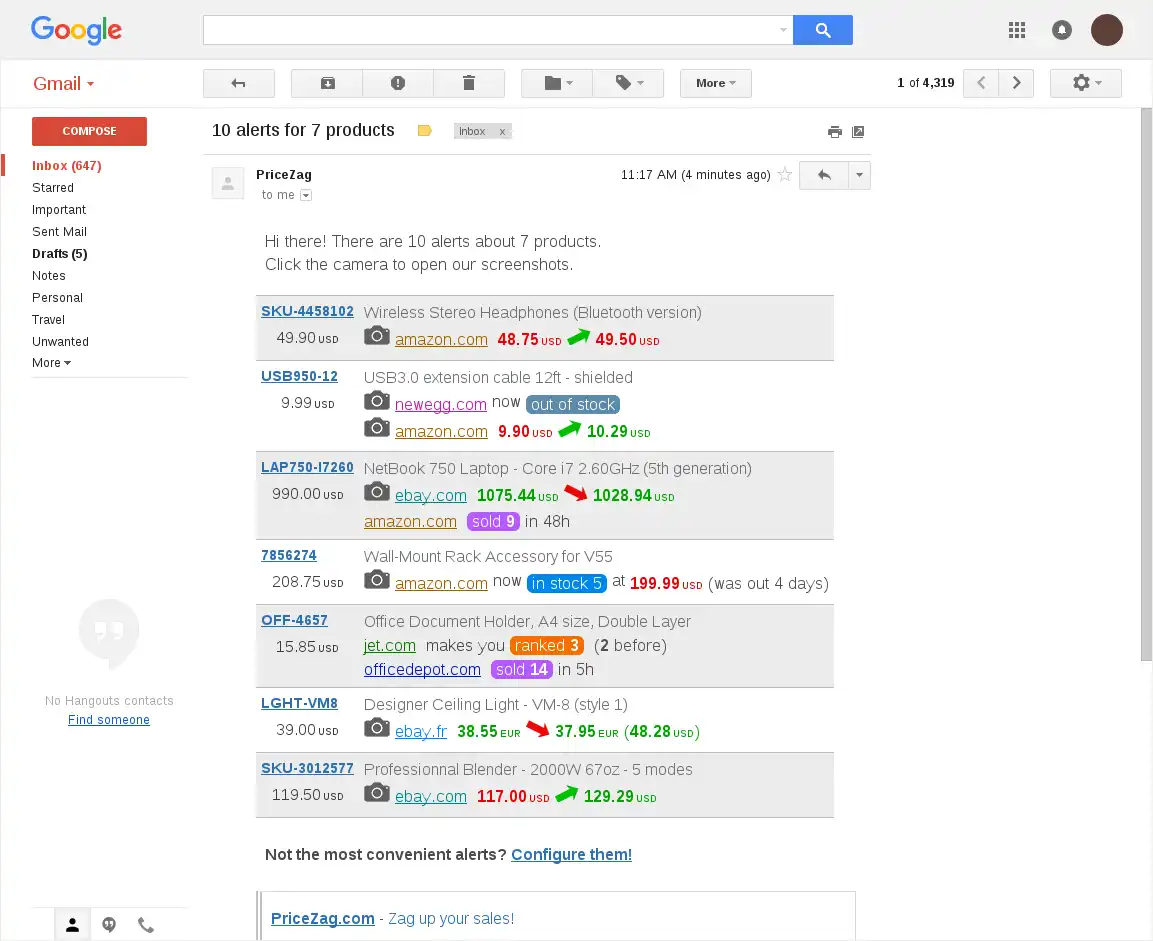
What you see in that email is just the result. Behind it, PriceZag lets you choose which price and stock changes matter, which products and retailers to watch, and who receives each alert. Online stores, pricing teams, brands and distributors can all tailor notifications to their needs.
Your own custom alert rules
Choose the events that matter to your business. Get alerted when a competitor drops a price by more than 5%, when your product is no longer the cheapest, or when an out-of-stock rival gets inventory back. You can also watch your margins and spot opportunities to raise your prices. Combine different rules without writing code.
PriceZag, based in Santa Monica, California, has helped online stores monitor competitor prices and stock since 2016. We check the product pages you choose, evaluate detected changes against your custom alert rules, and group related notifications into a single email instead of flooding your inbox.
No store integration is required. PriceZag monitors the competitor product pages you choose, so alerts work with any ecommerce platform - or for manufacturers and distributors monitoring retailers without running a store themselves.
What can trigger a PriceZag alert?
Set custom alerts for competitor price changes, stock availability, your market position, estimated sales and profitability. Here are the main types of rules:
| Alert type | What you can watch | Why it matters |
|---|---|---|
| Competitor price changes and thresholds | Prices rise or fall by a chosen percentage within a time window, or cross a fixed amount in any currency or your cost plus a percentage. | Catch price cuts, sudden increases and MAP-related price thresholds. |
| Your price ranking and market position | Your ranking changes, or your price crosses the market average or the average of the X cheapest or most expensive competitors, with a chosen offset. | Know when competitors overtake you or your price moves outside your target range. |
| Market-wide price changes | Competitors' average price changes by a set percentage over time or crosses a fixed amount. | Spot broader market shifts, not just one retailer's moves. |
| Stock and availability | A competitor's stock crosses a chosen quantity, sells out or becomes available again. | Spot supply gaps, restocks and sales opportunities. |
| Estimated competitor sales | Estimated units sold reach a chosen number within a time window, when inventory data allows it. | Notice fast-selling products using sales estimates. |
| Your own prices and margins | Your selling price changes by a chosen percentage, or your margin crosses a set percentage. | Watch your pricing and profitability. |
| Opportunities to raise prices | PriceZag identifies a potential opportunity to increase your price. | Find room to improve margins, not just react to price cuts. |
For many rules you can choose whether to react to price increases, decreases or both. Some compare changes over a time window; others trigger only when a particular line is crossed. That distinction matters: knowing that a competitor is already cheap is different from being notified when they become cheaper.
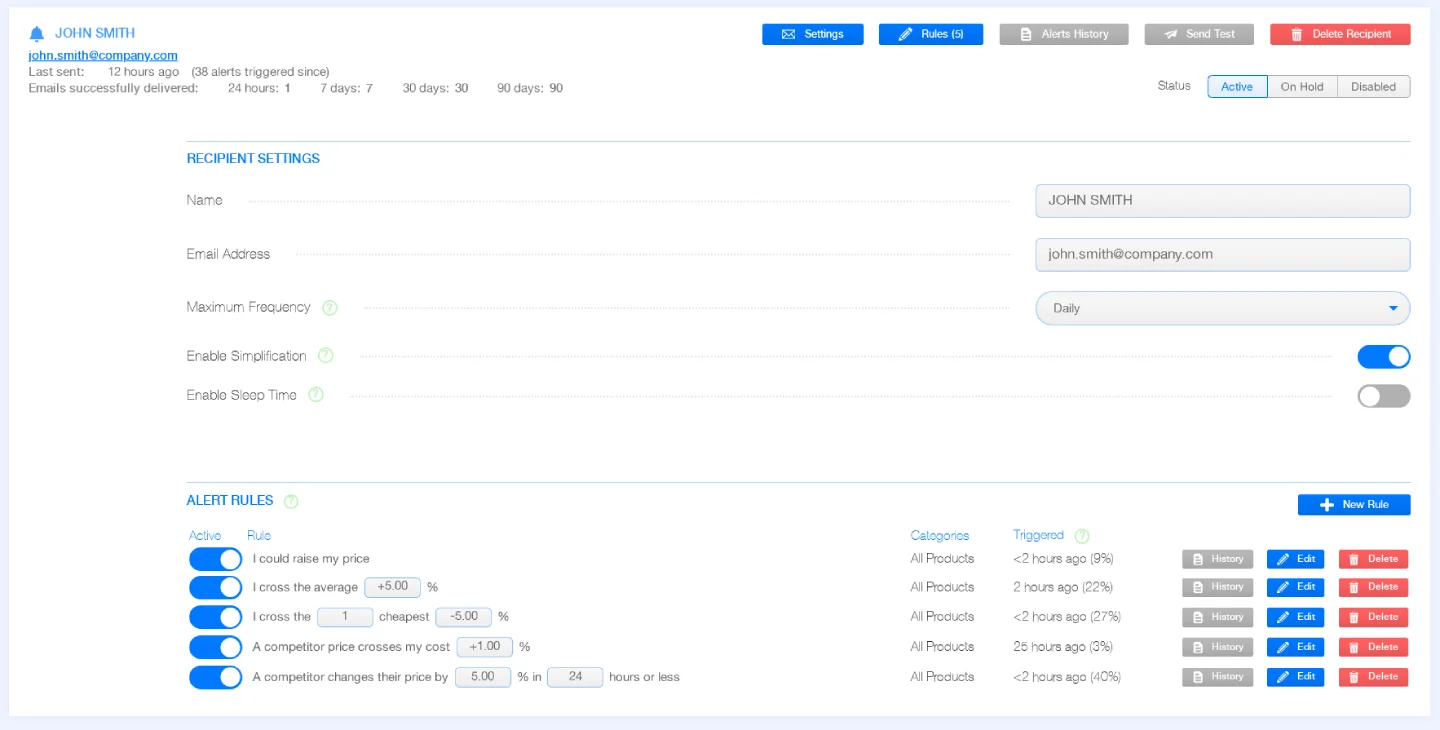
The right alerts for the right people
Send alerts to as many email recipients as you need, each with their own rules and delivery preferences. Recipients do not have to be PriceZag users. There is no separate charge per email recipient or notification: alert delivery is included in your plan.
This is especially useful when different people are responsible for different products or decisions:
- Category managers can receive alerts only for the product categories they manage - cameras for one person, power tools for another.
- Pricing managers can follow aggressive competitor price cuts, changes in price ranking and margin thresholds across the catalog.
- Purchasing teams can focus on competitors going out of stock or returning to stock, helping them identify changing market availability.
- Brands and distributors can watch retailers advertising below their Minimum Advertised Price (MAP), then review the captured evidence.
- Business owners can choose broader, less frequent summaries while the team receives more specific operational alerts.
One recipient can have several rules, and each rule can apply to all products or only selected categories. You can even send different alerts to two people responsible for the same products. Everyone sees what is relevant to their job.
Try PriceZag alerts now!
Screenshots of every monitored product page, price and stock alerts, custom rules. All features included.
Filter out the noise before it reaches you
A useful alert is one that tells you something you can act on. PriceZag lets you narrow eligible products and competitor websites rather than treating every price movement as equally important.
- Choose categories. Limit an alert rule to specific product groups, or use all products if you prefer.
- Target a particular retailer. Filter competitor URLs by text they contain - often a domain name - or exclude URLs you do not want considered.
- Ignore out-of-stock competitors. For supported rules, exclude unavailable offers from price comparisons so an unusable low price does not distract your team.
- Set meaningful thresholds. Choose your own percentages, monetary amounts, price offsets, stock levels, time windows and movement directions as the rule allows.
What each alert email includes
PriceZag sends HTML alert emails that group notifications by product. Each group shows the product name and reference code, your own price, and clear descriptions of the price or stock changes detected. Price increases and decreases are color-coded, with visual indicators that make multiple changes easy to scan in one message.
Each alert includes links to open the product in PriceZag or visit the retailer's listing. The camera icon beside a competitor alert opens a screenshot of the retailer's product page captured when the change was detected. You can check what the page actually showed, even if the retailer has changed its price or availability since then.
Every email also includes a plain-text version and a link to the recipient's alert preferences, so they can adjust which notifications they receive and when.
Powerful alerts without an overflowing inbox
One of the most useful parts of PriceZag's alert system is what happens between detecting a change and sending the message. Each recipient has three independent controls to make notifications fit their workday.
Maximum Frequency: group changes into fewer messages
Choose how frequently alert messages may be sent, from every 30 minutes to daily, with several options in between. PriceZag can collect multiple triggered alerts and send them together. Someone who needs urgent price-drop notifications can choose a shorter interval, while another recipient can opt for a calmer digest. More grouping can mean a little more delay before delivery.
Simplification: skip changes that cancel themselves out
Enable Simplification is on by default, and for good reason. Suppose a competitor drops a price from $120 to $110 and then to $100 before an email goes out. Instead of sending two separate changes, PriceZag can report the meaningful result: $120 to $100.
Or imagine a product goes out of stock, then comes back in stock before the queued alert is sent. Simplification can cancel those opposing notifications rather than bothering you about a temporary change that has already reversed. The canceled events remain visible in your alert history.
Sleep Time: respect each person's working hours
With Enable Sleep Time, you can pause sending messages outside chosen hours while PriceZag continues collecting the alerts. When notifications resume, pending changes are grouped into a message. Each recipient can have their own start and end times and time zone - useful for teams working in different countries or shifts.
Together, these settings help you choose between fast notification and a quieter, more useful inbox without losing visibility into what happened.
Email, SMS and full control over your alerts
Email is our recommended way to receive alerts. It has room for multiple products, descriptive messages, colors, links and screenshot icons. You can also send alerts by SMS/text message to supported phone numbers, at no additional charge. SMS is best for a small number of particularly important notifications: its limited message length cannot accommodate the rich formatting and links of an email.
You can manage everything in Reports & Sheets > Alerts. Add a recipient, set their preferences, then add one or more alert rules. A new recipient will not receive change notifications until at least one rule is configured.
As your needs evolve, you can:
- Test delivery with the Send Test button before relying on a recipient's alerts.
- Review Alerts History to see what triggered, what was sent, what is pending and what Simplification canceled, including screenshots and links where applicable.
- Tune noisy rules by checking how often each rule triggers, changing thresholds or temporarily disabling it.
- Pause a recipient with On Hold, which retains pending alerts, or disable alerts entirely when needed.
For teams with their own systems, PriceZag also provides a JSON API to manage alert recipients and rules programmatically. Most businesses can do everything they need directly in the dashboard.
Common questions
Can I send alerts to people who do not have a PriceZag account?
Yes. Add any email address as a recipient and assign its rules. That person does not need to sign in to receive email notifications. You can create as many email recipients as you need, with different rules for each.
Can each person receive alerts for different products or competitors?
Yes. Alert rules can be limited to selected product categories. Many rule types also let you include or exclude competitors by URL, choose movement direction and ignore out-of-stock offers. Each recipient has independent rules and delivery settings.
Are these real-time competitor price alerts?
Alerts are evaluated when PriceZag detects changes during its scheduled visits to monitored pages. Notifications are then delivered according to the recipient's frequency and sleep settings. They are automatic, but they are not continuous, instant monitoring of a retailer's website.
Can brands use alerts to monitor MAP violations?
Yes. A brand or distributor can monitor retailers selling its products and create rules for prices crossing chosen thresholds or changes in its price ranking. For a practical setup, see MAP monitoring for brands and distributors. Screenshots help review what a retailer advertised when a change was detected.
Does PriceZag charge extra for emails or SMS alerts?
No. Alerts are included in your PriceZag plan without a separate per-message or per-recipient fee. Email is usually the better choice for detailed notifications; SMS availability varies by destination and is better suited to short messages.
Will I receive alerts for prices that are already low when I first add a product?
Alert rules generally trigger when an observed price or stock value changes and meets your conditions, not simply because an existing value is below a threshold. You can review current pricing in the dashboard or Excel reports without waiting for an alert.