
MAP monitoring for brands and distributors
Monitor advertised prices across retailers selling your products, receive price alerts, and save screenshots to document potential MAP policy violations.
Yes, PriceZag is for you even if you have no competitors to track. If you manufacture, distribute, or own a brand sold by other businesses, you can use PriceZag to monitor what those retailers advertise online. Instead of following rival products, you follow your own products across your dealer and reseller network.
PriceZag is often described as competitor price monitoring software because that is how many online stores use it. For a brand or distributor, the same technology becomes retailer price monitoring, MAP monitoring, and brand protection. You do not need to operate an ecommerce store or use automatic repricing.
Monitor the retailers selling your products
Whether you supply a handful of specialist dealers or hundreds of online resellers, keeping track of their advertised prices by visiting every website yourself is difficult. Listings can change between visits, and by the time someone reports a low price, the retailer may already have changed it.
PriceZag repeatedly visits the product pages you choose and records their prices and availability. You can see how advertised prices evolve, receive email alerts about changes, and review the page screenshots collected during monitoring. The retailers you follow may be authorized dealers, independent resellers, or other websites offering your products.
What is Minimum Advertised Price (MAP) monitoring?
MAP stands for Minimum Advertised Price. A MAP policy defines the lowest price at which certain products may be advertised, subject to the policy's terms. Brands use MAP monitoring to identify listings that may fall below their advertised-price guidelines, review the circumstances, and decide whether follow-up is appropriate.
MAP is different from MSRP (Manufacturer's Suggested Retail Price), which is a recommended retail price. A retailer advertising below MSRP is not necessarily violating a MAP policy. What matters is the actual advertised price, the applicable policy, the specific product, and any permitted exceptions.
PriceZag helps you collect the observations needed for that review. It does not create, interpret, or enforce your pricing policy for you.
How retailer price monitoring works with PriceZag
- Add your products. Create a list of the products your brand sells, or import them from a spreadsheet. You can organize products using your own SKUs or reference codes, without connecting an online store.
- Add retailer product pages. For each product, provide the URLs of the matching listings on the retailers you want to follow. These are ordinary product-page links, not links to the retailers' home pages.
- Follow their advertised prices. PriceZag revisits those pages, extracts available price and stock information, and builds a history that you can review in your account or export through Excel-compatible reports.
- Get alerted and investigate. Configure alerts for relevant price changes or when a retailer's price crosses a chosen threshold. Review the listing and its screenshot before deciding whether it conflicts with your policy.
Tip for MAP alerts: Set each product's My Price to its MAP amount, then create a My Ranking in price changes alert. A My Rank of 1 means no retailer is advertising below your MAP; 2 means one retailer is below it. The alert can notify you when that rank increases. In your Excel reports, add the My Rank column: ideally every product shows 1, and higher numbers highlight listings to review.
Screenshots: see what the retailer actually advertised
This is one of the most valuable parts of PriceZag for MAP monitoring. Each time PriceZag visits a product page, it uses a real browser and captures a screenshot of the page as it appeared during that visit. That gives you more than a price in a spreadsheet: it gives you a visual record of what the monitoring system saw.
Imagine your MAP for a product is $199 and a retailer advertises it for $179. When you investigate, the retailer may already have raised the price. A saved screenshot lets you show the earlier listing instead of relying on a number copied into an email.
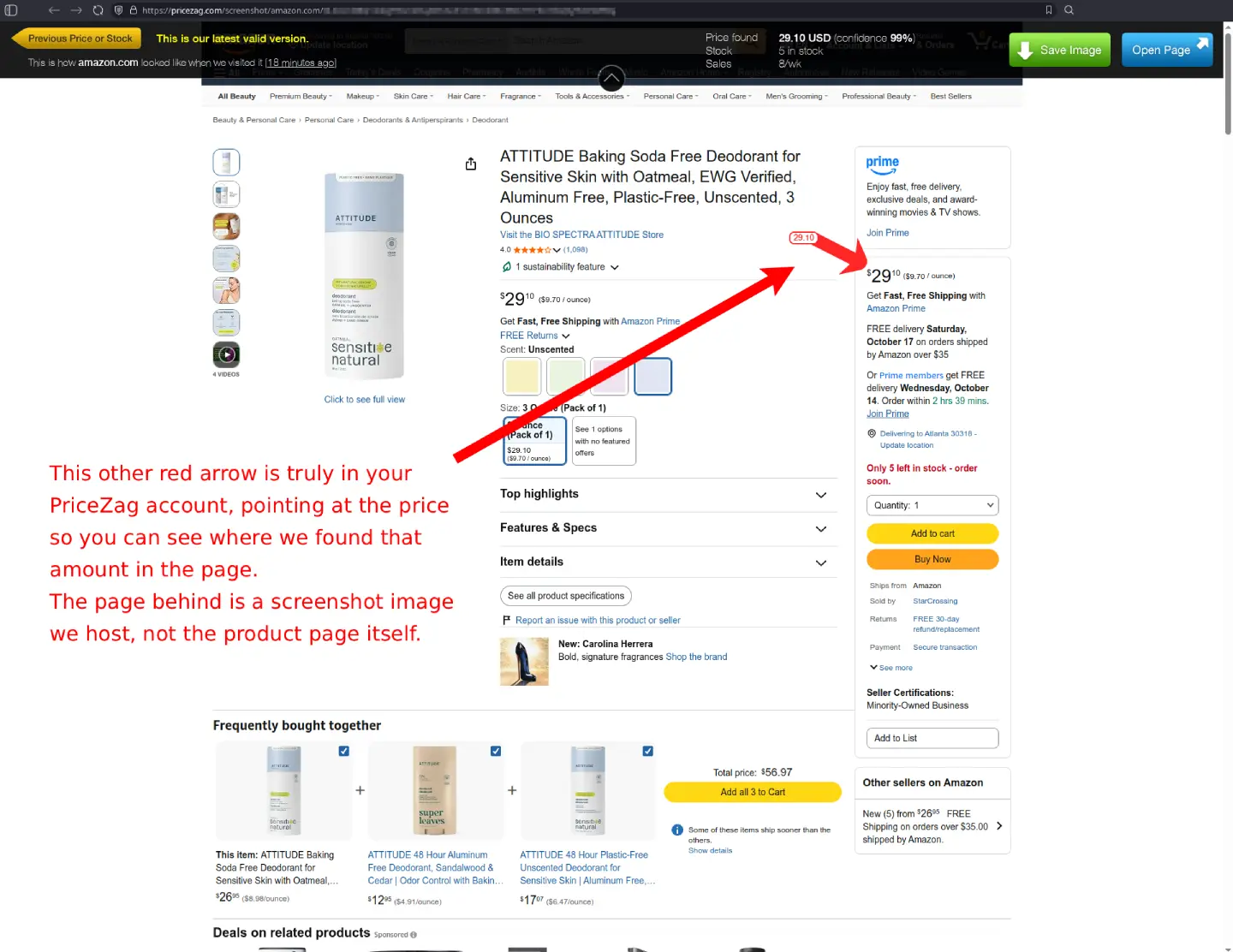
PriceZag retains approximately one month of screenshot history for monitored product pages. You can open screenshots from the price history or from relevant email alerts, move back through earlier price or stock changes, and use Save Image to download the evidence you want to keep longer. Screenshot links can also be shared when discussing a listing with a retailer.
Learn more about screenshots and their history.
From a possible MAP violation to a documented follow-up
A low advertised price is a reason to investigate, not automatically a confirmed policy violation. Before contacting a retailer, it helps to check a few details:
- Verify the exact product. Check the model, variant, package size, and SKU so that you are comparing the right listing with the right MAP amount.
- Review the offer. Consider whether the advertised price includes a permitted promotion, clearance exception, bundle, or other condition covered by your policy.
- Save the evidence. Keep the screenshot and product URL, along with the date, observed price, and relevant MAP amount. Saving a copy matters because website listings and PriceZag's screenshot history can change over time.
- Follow your policy process. If the listing appears inconsistent with your policy, share the relevant information with your retailer contact or compliance team and keep a record of the outcome.
The goal is a clear, repeatable process: observe, verify, document, and follow up. A screenshot helps support your findings and makes a discussion more concrete, while you retain control over any decisions.
Monitoring retailers, even when websites are difficult to access
Some ecommerce websites use anti-bot protection or load prices through scripts that simple page scrapers cannot reliably read. Missing a listing can mean missing a price change. PriceZag uses real browsers and a large pool of IP addresses to collect pricing data from many of these more challenging websites.
PriceZag also records stock information and supports websites that display different currencies. And if a reported price seems unusual, the screenshot lets you inspect the page that produced it. These capabilities are especially useful when you monitor resellers across different websites and markets.
You can use the collected data alongside your existing dealer management process, with price-change alerts, spreadsheets, or the PriceZag API. Your team does not need to change the way it sells products to benefit from monitoring.
Frequently asked questions
Do I need my own ecommerce store to use PriceZag?
No. Brands, manufacturers, and distributors can monitor the product pages of their retailers without operating an online store, connecting a sales platform, or using repricing.
Does PriceZag automatically find every reseller selling my products?
You choose which retailer product-page URLs to monitor. PriceZag follows those pages and collects their prices and screenshots; it does not promise to discover every seller on the internet automatically. You can import product data and build your list of retailer URLs as your monitoring grows.
Can I use screenshots when contacting a retailer about MAP?
Yes. You can download a screenshot showing what PriceZag saw on the retailer's product page and include it in your records or communication. Screenshots document the page at a particular visit; whether a listing constitutes a violation depends on your policy and the circumstances.
Can I monitor reseller prices even without a MAP policy?
Yes. You may simply want to understand how your products are being advertised, follow retail price changes, check availability, or compare prices across your distribution network.
Can I start MAP monitoring for free?
Yes. PriceZag has a Free Forever plan covering up to 100 monitored product-page URLs, with no credit card required.