
Pricefy vs PriceZag: How reliable is the data?
Compare Pricefy and PriceZag on accurate competitor prices, difficult websites, screenshot evidence, stock monitoring, frequency of updates and feature limits.
The most important feature of a competitor price monitor is getting the right price. Alerts, reports, graphs and automatic repricing mean nothing if the price collected is incorrect. A wrong reading can make a competitor appear cheaper than it is and cause you to lower your own price unnecessarily, cutting into your profits.
Pricefy and PriceZag both offer competitor price tracking and pricing tools, but they take different approaches to difficult websites and verifying results. PriceZag uses real graphical browsers on our own hardware and saves a screenshot of every monitoring visit. You can check what a website actually displayed, even after it changes.
Pricefy offers a Chrome extension for websites that block its monitoring. Depending on the setting, it uses your own browser and internet connection to collect product pages or help Pricefy access them, which essentially means they ask you to do the monitoring yourself. This defeats the purpose of using a price monitoring service.
Try both on the competitors that matter.
Test the same competitor product URLs in Pricefy and PriceZag, especially websites that are difficult to monitor. Compare the prices and stock results, and open the screenshots PriceZag captured.
A monitoring service should collect the correct prices automatically and let you verify them later. PriceZag combines our own browser infrastructure with screenshots from every visit, so you can see the evidence behind the numbers.
Can it monitor difficult websites without your help?
Some online stores make price monitoring difficult. Their pages load prices through JavaScript, show different prices to visitors in different countries, or use protections such as Cloudflare to block automated visits. A price tracker must handle these obstacles repeatedly, without asking the customer to visit each website themselves.
Pricefy provides a Chrome extension for websites its servers cannot monitor or that show different prices by location. In one mode, it opens the competitor's product pages on your computer and sends them to Pricefy. In another, it uses your browser session to help its servers get through. The extension may help reach a website, but that is your own computer doing their work, which makes you wonder what you are paying a monitoring service for.
There is another risk: repeated visits from your own internet connection may cause a competitor's website to flag and block your IP address. You could end up with your internet connection blocked from the very websites you need to monitor, leaving you unable even to check prices manually.
PriceZag handles this work on our own infrastructure. Our real graphical browsers run on physical computers with different GPUs, use thousands of IP addresses around the world and load websites much as a human would. Our technical team maintains the monitoring methods as retailers change their sites. We do not ask you to work for us!
Incorrect prices and failed monitoring: what users report
Getting onto a product page is only half the job. The software must also find the right price. A page might display a regular price, a sale price, an old crossed-out price or prices for several product options. Choosing the wrong number can make your reports and alerts misleading. Worse, automatic repricing can drop your own prices unnecessarily and eat into your profits.
Pricefy's own help center describes this exact problem. It gives an example in which a product page visibly shows EUR 9.99, but hidden information in the page's code says EUR 12.99. Pricefy can collect EUR 12.99 instead of what the shopper sees, and its documentation tells users to contact support to change how that website is read. For websites its servers cannot reach, customers may instead have to set up their own browser through the Chrome extension to do the monitoring work.
Public customer reviews raise similar concerns. In an April 2026 Shopify App Store review, a Pricefy customer who had used the service for around 18 months described incorrect prices and large numbers of competitor URLs failing to update. The customer also described frustrating exchanges with support. Another July 2026 review reported inaccurate product matching, unreliable competitor tracking and unhelpful support. Other negative reviews mention trouble getting assistance.
These are individual customers' experiences, not a measured error rate. They highlight questions worth asking before relying on a monitoring platform: How well does it handle troublesome websites, and how can you investigate a price that looks wrong?
PriceZag uses our own browser infrastructure and saves a screenshot image of what the browser saw during each visit, with 30+ days of history available on all plans. When a price looks wrong, you can inspect the image rather than simply trusting the number.
No screenshots to verify everyday prices with Pricefy
Pricefy does not save screenshots of its regular competitor price checks. It only takes a screenshot when its Minimum Advertised Price (MAP) service detects a violation - a retailer advertising below a brand's specified minimum price. That screenshot is triggered by the detected violation, not by the routine monitoring visit itself.
No special MAP use-case means no screenshot. For ordinary price and stock monitoring, there is no saved image to inspect when Pricefy reports a suspicious reading. Opening the live product page later cannot tell you what was displayed at the time: the price or stock may already have changed.
Imagine a tracker records a competitor at $179 instead of $199. Was there a brief sale? Did it read an old price or the price of another variation? Did it simply extract the wrong number? Without an image from that moment, you cannot confirm which explanation is correct.
PriceZag takes a different approach. We capture a screenshot on every monitoring visit and keep 30+ days of images, always included in your subscription. Click the camera icon beside a reading to inspect the page together with the detected price, currency, stock status, sales estimate when available, and confidence percentage. If we ever select the wrong price, the screenshot helps you catch our mistake too.
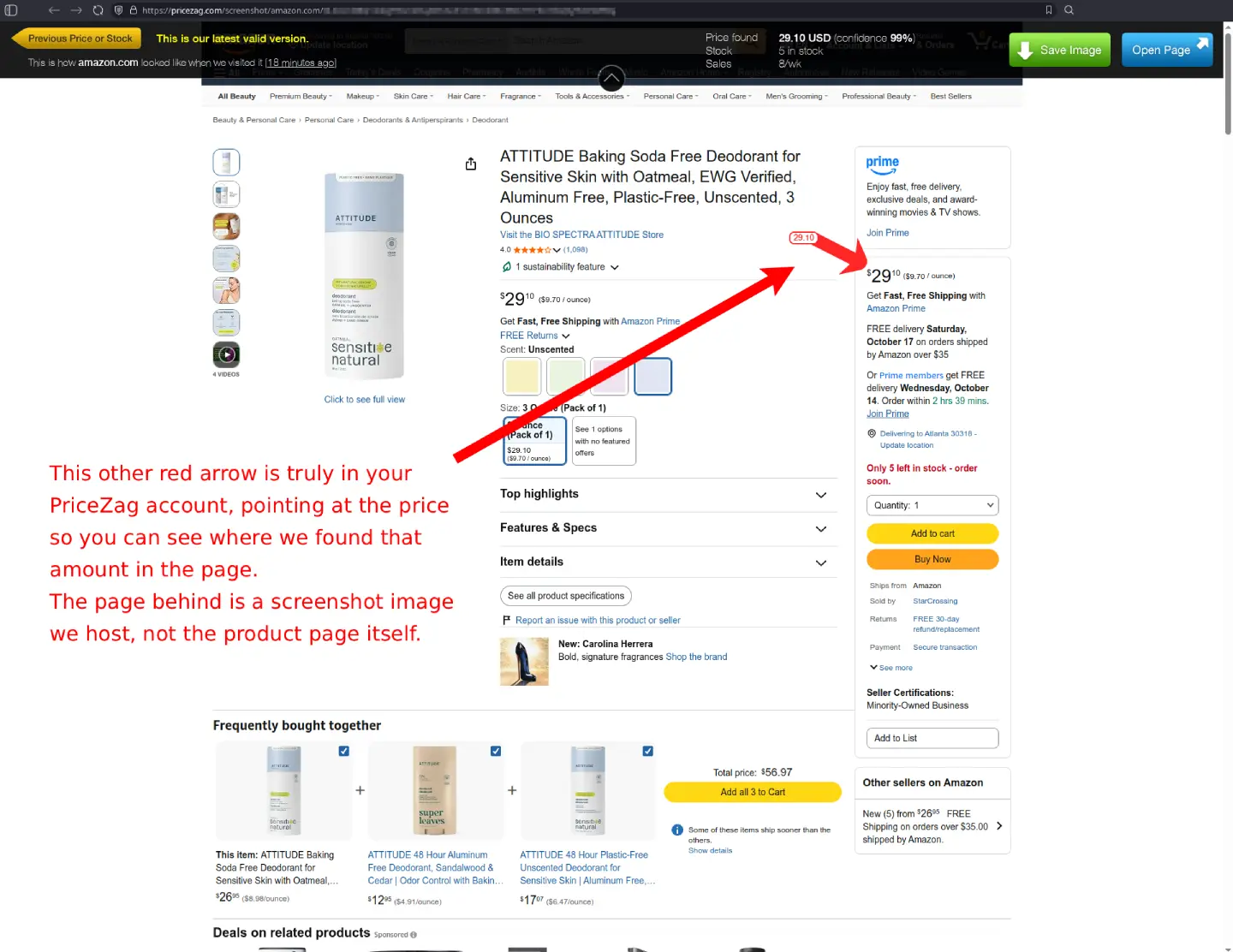
Regular screenshots are especially important for automatic repricing. An incorrect competitor price can produce an incorrect price for your own store. Being able to see what was captured provides a way to investigate before you trust that data.
Stock information can be wrong too
Pricefy's documentation explains that it can read stock availability from information hidden in a product page's code, rather than directly from the stock message visible to shoppers. Pricefy acknowledges that this information can disagree with what the website actually displays, or be missing entirely.
This matters because stock status affects pricing decisions. If a competitor has sold out, you may have an opportunity to raise your selling price. If the monitoring software incorrectly says the competitor still has stock - or incorrectly says it is sold out - that opportunity can be missed or misunderstood.
PriceZag checks competitor prices and availability using rendered product pages. When a website reveals exact inventory quantities, we can monitor those too. The saved screenshots let you check what the retailer displayed when we recorded a stock change.
Five price checks a day, instead of two
Pricefy's plans provide only 2 price updates per day on paid plans and a single one on their Free plan. PriceZag checks competitors' prices and stock 5 times a day on every plan, scheduling visits intelligently around each website's market and past behavior.
Imagine a competitor reduces its price in the morning, sells out in the afternoon and restores its usual price that evening. Depending on when the monitoring runs, two checks might miss some or all of these events. Five visits give you more opportunities to catch short-lived changes and keep more useful price and stock history.
More frequent updates only help if the captured prices are correct. That's why we consider successful crawling and accurate extraction more important than the number of daily checks.
Pricefy vs PriceZag: feature comparison
| PriceZag | Pricefy | |
|---|---|---|
| Location | Santa Monica, California, USA Since 2016 | Italy |
| Difficult websites | Real graphical browsers on our own GPU-equipped hardware, with thousands of IP addresses worldwide. | Chrome extension offered when its online monitoring is blocked; runs collection tasks in the customer's browser. |
| Screenshots | Every monitoring visit, with 30+ days of history. Always included. | No screenshots of regular visits. Screenshot captured only when its MAP service flags a price violation. |
| Verify an earlier price | Open our saved page image from the visit, with price, currency, stock, sales estimate, and confidence percentage. | No image saved. No way to verify. |
| Price checks frequency | 5/day on every plan. | 1/day on Free, 2/day on paid plans. |
| Repricing | Advanced rules using competitor prices, stock, costs and margins. On all plans. | Repricing available from Pro, with fully automatic price updates restricted to Business and Enterprise. |
| Alerts and reports | Custom email/SMS alerts, unlimited email recipients, Excel/CSV exports and scheduled reports included. | Limited number of recipients. Limited schedules. |
| API | Extensive JSON API covering prices, monitoring data, repricing, screenshots download and more. Optional. | Basic API for products, competitor data, alerts and reports. |
| Competitor sales estimates | Estimate units sold and income when retailers show numerical inventory levels. | No estimation of competitor sales. |
Pricefy vs PriceZag feature comparison. Reviewed October 2026. Pricefy features vary by plan and are subject to future change.
A price you can't verify is a service you can't trust
Try the same product URLs in both services. Compare what gets collected and whether there is visual proof when a price looks suspicious.
What do you get on each plan?
PriceZag includes advanced repricing rules, custom price and stock alerts and scheduled Excel reports on all plans. Repricing rules can account for competitor prices, stock, your product costs and margin limits. Connect your store through Shopify, WooCommerce or our JSON API.
Pricefy reserves repricing for Pro and higher plans, with automatic price updates restricted to Business and Enterprise. Alert recipients and report schedules also have plan limits.
Which monitoring results can you trust?
The most useful comparison is to test the same competitor product URLs in both platforms:
- Include difficult websites. Can the service monitor them automatically, without using your own browser and internet connection?
- Check the actual prices. Does it capture the correct offer, currency, product variation and stock status?
- Look for evidence. If a price is surprising, can you see what that page displayed when the reading was taken? With Pricefy, you cannot.
PriceZag is based in Santa Monica, California, and has provided competitor price monitoring since 2016. We don't ask you to accept a claimed accuracy percentage. Try our browsers on the websites you need, open the screenshots and judge the results yourself.
Comparison prepared by PriceZag in October 2026 using Pricefy's documentation and customer reviews. Plan details can change.