Price and stock monitoring on protected websites
PriceZag monitors prices and stock on many bot-protected ecommerce websites using real browsers, varied hardware, thousands of IP addresses and smart retries.
A price monitoring service is only useful if it can actually reach the websites you need to monitor. Many ecommerce stores actively block automated visitors. A cheap monitoring tool may collect prices from straightforward websites, then fail as soon as a major retailer puts stronger protections in place.
At PriceZag, monitoring difficult, bot-protected websites is a major part of our work, not an occasional problem we leave to customers. We've invested in real browser infrastructure, specialized hardware, a large pool of IP addresses and systems that keep trying when a website is difficult to access. You benefit from that infrastructure as part of your price and stock monitoring.
Why some ecommerce websites are difficult to monitor
Retailers want to protect their websites from abusive traffic, inventory hoarding, attacks and unwanted automated requests. Many use services such as Cloudflare, Akamai, DataDome or Imperva to detect bots, challenge suspicious visitors or block requests.
These protections can affect legitimate competitor price monitoring too. A basic script might request a product page and receive a challenge screen instead of a price. Other pages depend heavily on JavaScript, or display different prices and availability depending on where the visitor is connecting from.
That creates a practical problem: the retailers you most want to monitor may also be the hardest to reach. A service that works well only on easy websites can leave gaps in your competitive data, exactly where you need it most.
How PriceZag monitors protected websites
We don't treat ecommerce pages as simple files to download. Our monitoring infrastructure is built to load real product pages, read their prices and stock, and deal with the conditions encountered on modern retail websites. Some of the work happens behind the scenes:
- Real graphical browsers with JavaScript. We visit product pages using full, non-headless browsers that render the website and execute its JavaScript. This helps us read content that may not be present in a basic HTML request.
- Real hardware and varied GPUs. Our own servers give us control over browser hardware, including a variety of graphics processors that help avoid the uniform browser fingerprints associated with standard cloud environments. We don't rely on the virtualized setups common in inexpensive crawlers.
- Thousands of IP addresses from multiple providers. Maintaining a large, varied pool of addresses gives us more flexibility when a website doesn't accept a particular source of traffic. Maintaining thousands of IP addresses on your own, just to monitor websites for one business, would be expensive and difficult to justify. By sharing this infrastructure across thousands of PriceZag customers, we make that capability affordable as part of your subscription.
- Visits matched to each retailer's market. We select an appropriate location from our infrastructure in the United States, Australia and United Kingdom, based on the website's audience. When we don't have a location in the exact country, we choose a suitable nearby option. This also helps websites return the expected currency, prices and stock information.
- Intelligent retries and ongoing improvements. When a page fails to load or doesn't provide a valid price, our system can try again using different resources. Our developers continually improve how we handle changing websites and anti-bot systems throughout the year.
Our location in Santa Monica, near a Google campus and a strong local technology community, has helped us build a team of experienced engineers focused on these difficult monitoring challenges. Developing and improving this technology has been a core part of our work since 2016.
There is considerably more going on behind the scenes, but you shouldn't need to learn how browser fingerprints, IP networks or bot challenges work just to monitor a competitor's prices. That's our job.
What happens when a website blocks a visit?
A failed attempt doesn't automatically mean the product is impossible to monitor. Our system can retry the page, adjust how it is visited and continue checking it over time. We don't charge extra for those additional attempts. You pay for the URLs you monitor, not for every browser or IP address we may need to try.
Some websites remain difficult despite this work. Their updates may arrive less frequently, and occasionally we won't be able to obtain reliable data from a page at all. We won't claim that every protected website works perfectly, every time.
Rather than hiding these problems, PriceZag tracks the status of monitored URLs. In your account, Reports & Sheets > Domains > Sick URLs identifies pages that have recently failed or have been failing repeatedly. This makes it easier to distinguish a temporarily troublesome page from one that needs attention. If a particular retailer is important to you, our team can investigate it.
More complete price and stock data, with proof
All that technology serves one practical purpose: helping you obtain useful competitor price and stock data from more of the websites that matter to your business. Once we successfully read a product page, you can use the information in alerts, Excel and CSV reports, repricing rules, history graphs and the API.
And you don't have to simply trust the number we report. Every successful page visit is recorded with a high-resolution screenshot of what our browser saw. Click the camera icon next to a retailer's price to inspect the captured page and verify whether we extracted the correct value. We keep approximately a month of screenshot history.
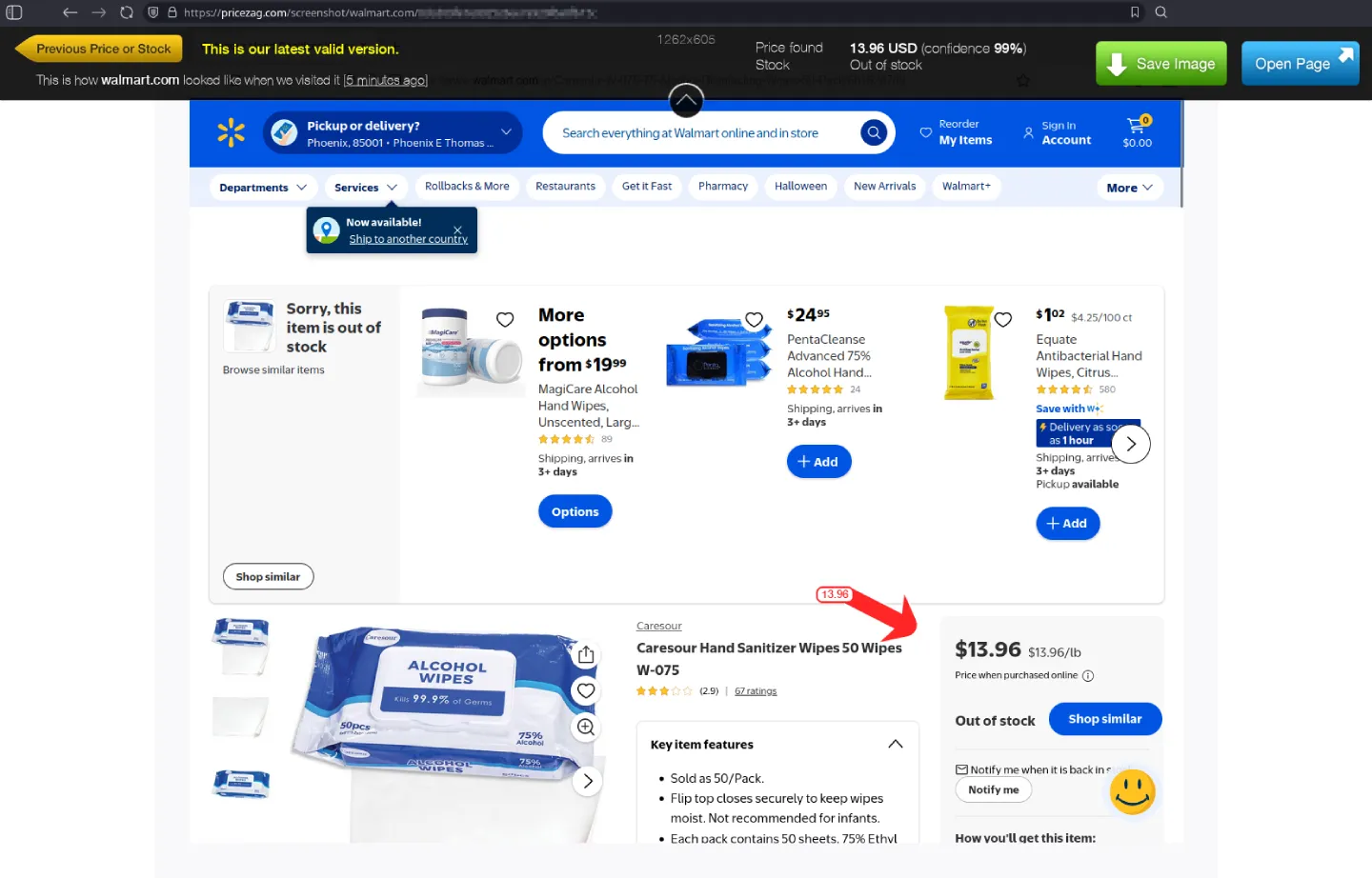
This transparency matters especially on challenging websites, where pages can change unexpectedly or show different information to different visitors. You can inspect what we actually received rather than relying on an unexplained price in a database.
Don't just take our word for it. Compare us.
If you're evaluating price monitoring services, try the same product URLs with PriceZag and another provider. Include the big retailers and difficult websites you really care about, not only a few easy stores.
- Test the same products. Add a representative selection of retailer product pages to each service.
- Check the actual results. Does each service find the correct price, currency and stock? Can you inspect a screenshot to verify the result?
- Check again over several days. A successful first visit is useful, but consistent monitoring is what gives you a dependable history, alerts and reports.
We encourage the comparison. Our 14-day free trial lets you monitor up to 200 products without a credit card. Start with the websites that have caused problems for other tools and see how PriceZag performs for yourself.
Common questions
Can PriceZag monitor sites protected by Cloudflare or other anti-bot systems?
Yes, we can monitor many ecommerce websites that use bot protection, including sites that are difficult for simple scripts to access. We use real browsers, varied hardware, a large pool of IP addresses and adaptive retries. Every website is different, so we recommend testing the specific retailer pages you need rather than assuming any service can access them all.
Does this require anything to be installed on my store?
No. PriceZag visits the retailer product pages you choose to monitor. You don't need to install software on your own ecommerce store or use a particular shopping platform to monitor competing websites.
Do retries cost extra?
No. When we need additional browser visits or IP addresses to get a reading, those extra attempts don't incur separate charges. Your plan is based on the number of monitored URLs.
Will every protected website work?
No monitoring service can guarantee that. Some sites may block visits for a period of time or prevent reliable price extraction. PriceZag retries difficult pages, tracks failed URLs and lets you investigate problems. If a particular website is important to you, you can ask our team to look into it.
How can I tell whether the price was read correctly?
Open the screenshot from the camera icon beside the competitor's price. You can see the rendered page our browser visited, together with the price, currency, stock and confidence information we detected.