
Automatic repricing based on competitor prices
Monitor competitors' prices and stock, calculate selling prices from your own rules, and update your store while keeping control of costs and margins.
Automatic repricing helps online stores adjust their selling prices as competitors change theirs. PriceZag combines competitor price monitoring with rule-based repricing: it checks the product pages you choose, follows competitors' prices and availability, and calculates the selling price that fits your strategy.
You decide whether to compete on price, protect a minimum return over your costs, or raise prices when the market gives you room. You can use these calculated prices in any online store, with automatic updates through a direct integration or the PriceZag API. You can also review and export the results without automating your store.
How automatic repricing works
- Add your products and competitors. Import products from your store or a spreadsheet, then add the competing product-page URLs you want PriceZag to monitor. Each URL should refer to the same product you sell.
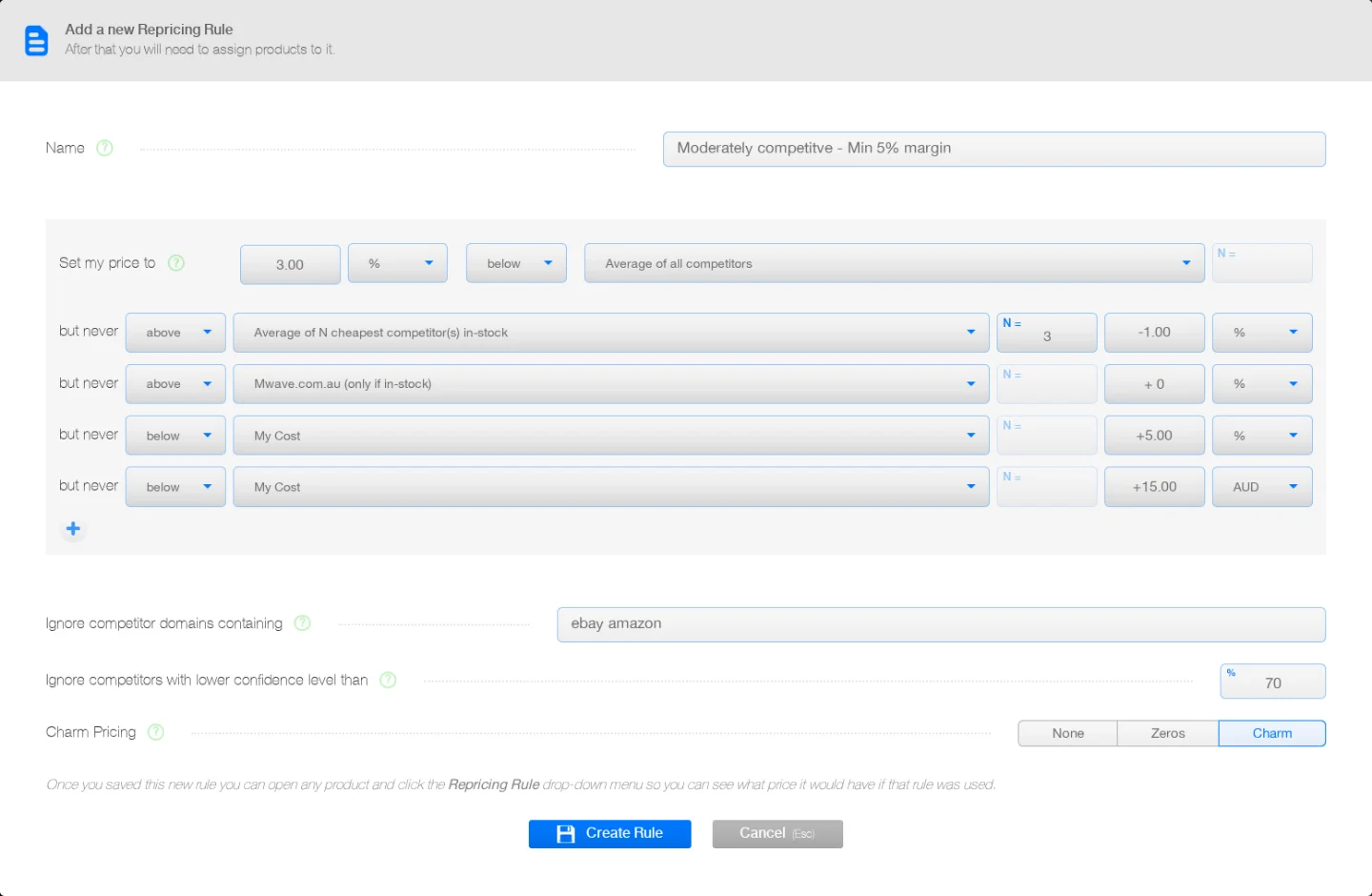
- Create a pricing rule. Choose a starting price, such as 1% below the average of the three cheapest competitors. Then add conditions to limit or adjust the result.
- Assign the rule to products. Different products can use different rules. You can assign a rule individually or to many products at once.
- Use the calculated price. PriceZag displays a Repricing Amount for each applicable product. Apply prices automatically to your store through a direct integration or the API, or export them to a spreadsheet for review and import.
Rules are created under Automation > Repricing in your PriceZag account. You choose which products use each rule, and you can change or disable a rule whenever you want.
Set prices for the way you compete
PriceZag's rules are built from readable conditions rather than programming code. A rule starts with "Set my price to", followed by optional "but never" conditions. These can refer to competitors, your product cost, or your own recent prices.
| Your goal | What the rule can do |
|---|---|
| Stay competitive | Price below the cheapest competitor, or below the average of the two or three cheapest sellers. |
| Protect profitability | Set a floor based on your cost plus a percentage or a fixed amount. |
| React to availability | Compare only with competitors that have stock, instead of following unavailable offers. |
| Focus on selected sellers | Follow a particular competitor, or exclude domains and labeled offers that should not influence your pricing. |
| Avoid price swings | Use your average selling price over a chosen number of hours to moderate how fast prices move. |
You can set amounts as percentages or in currencies, and optionally finish prices with familiar endings such as .99 or .95 using charm pricing. The same rule can be reused across hundreds of products, while each product uses its own competitor prices and cost.
Example: compete without selling too cheaply
Suppose you sell an item that costs you $100. The average price among its competitors is $108. You want to be 2% below that average, but you also want your selling price to stay at least 10% above your cost.
- Starting price: $108 minus 2% = $105.84.
- Cost-based floor: $100 plus 10% = $110.
- Calculated Repricing Amount: $110, because the floor takes priority.
Instead of automatically undercutting an already low market price, the rule keeps your chosen cost protection in place. This example assumes charm pricing is turned off.
Safeguards for automated pricing
When you automate a price, the quality of the competitor data matters as much as the rule itself. PriceZag includes several ways to avoid reacting blindly to an unusual price:
- Price confidence: PriceZag assigns confidence scores to extracted prices. Repricing can ignore competitor prices with low confidence; the normal setting uses a 70% threshold.
- Cost and price limits: Add "but never below" or "but never above" conditions to define boundaries for each rule.
- Limits on sudden changes: The repricing system restricts how far a price can move in one update, helping reduce the impact of an unusual reading.
- Control by product: Assign, change, remove or disable rules without having to apply the same strategy to your entire catalog.
Optional charm rounding adjusts a calculated amount slightly to create a cleaner selling price. If an exact boundary is important to you, you can leave that rounding turned off.
Strong price monitoring makes repricing useful
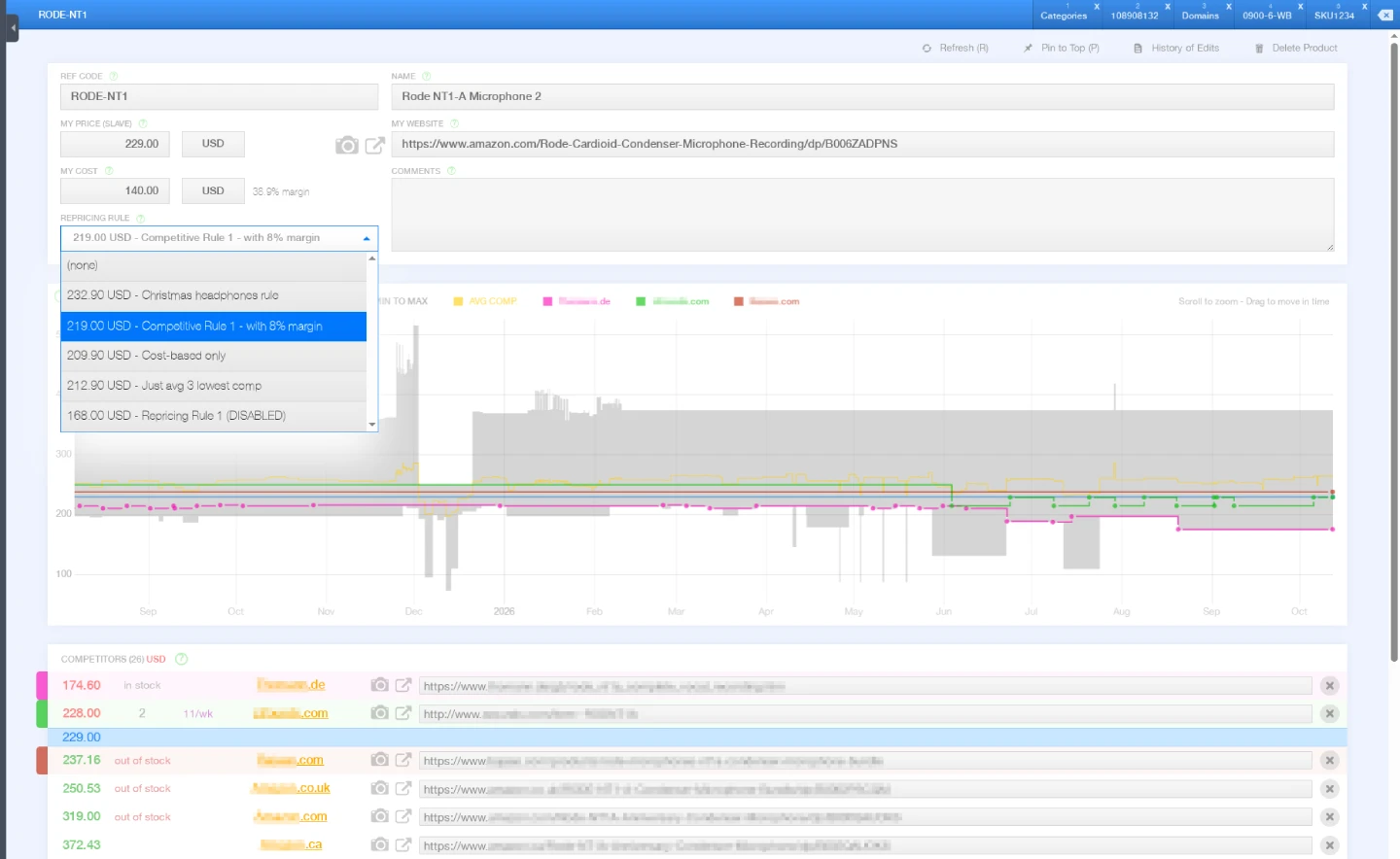
A carefully designed pricing rule is of little use if a competitor's website blocks your monitoring software or an incorrect price slips into the data. PriceZag uses browser-based crawling and a large IP infrastructure to monitor many ecommerce websites that are difficult for basic scrapers to read.
For additional verification, screenshots of checked pages let you inspect what PriceZag saw when it collected a price. Combined with confidence scores and monitoring of protected websites, this helps you base pricing decisions on information you can investigate rather than unexplained numbers.
Use repricing with your online store
PriceZag works with online stores on different ecommerce platforms. You can review calculated prices in your account, export them to spreadsheets, or send them to your store automatically. Competitor prices are checked according to your monitoring schedule, and automatic store updates can run approximately every five minutes.
- Your store platform
- Use the PriceZag API to retrieve calculated prices and apply them to your store. If your ecommerce platform provides an API, a developer or AI coding assistant can help you connect the two.
- Shopify
- Ready-to-use integration for importing products, synchronizing prices and applying repricing automatically.
- WooCommerce
- Ready-to-use integration for the same product import and automatic pricing workflow.
- Spreadsheets
- Export Repricing Amounts to Excel-compatible spreadsheets if you prefer to review prices or update your store through your existing process.
Every store can use PriceZag to monitor competitors and calculate new prices. You only need an integration or API connection if you want those prices sent to your store automatically.
Frequently asked questions
Can PriceZag raise my prices as well as lower them?
Yes. Your rules can set prices above or below competitor prices, and they can consider stock availability. That means you can avoid unnecessary discounts when competitors raise their prices or go out of stock.
Do I need to use automatic store updates?
No. You can assign repricing rules, see the calculated amount for each product, and export it to a spreadsheet. If you want the prices applied to your store automatically, you can use a direct integration or connect through the API.
What happens if a competitor's price is unreliable or missing?
You can have PriceZag ignore low-confidence prices when calculating repricing. If the starting condition of a rule cannot be calculated, there is no new Repricing Amount from that rule for the product at that time.
Can I try repricing without paying?
Yes. You can try automatic repricing free for 14 days, with up to 200 products. No credit card required.