
Track competitor prices and stock in one place
See who's cheaper, who's sold out, and where you might have room to raise your prices. PriceZag checks competitors' product pages 5 times a day, recording price and stock history with screenshots you can verify.
- Screenshots of each page
- 5 checks daily
- Works on protected websites
- Spot chances to raise prices
The cheapest competitor isn't always the one you need to follow. Their product might be out of stock, or their low price might be a temporary promotion. PriceZag shows you both prices and availability, along with the history behind them, so you can protect sales without cutting your margins unnecessarily.
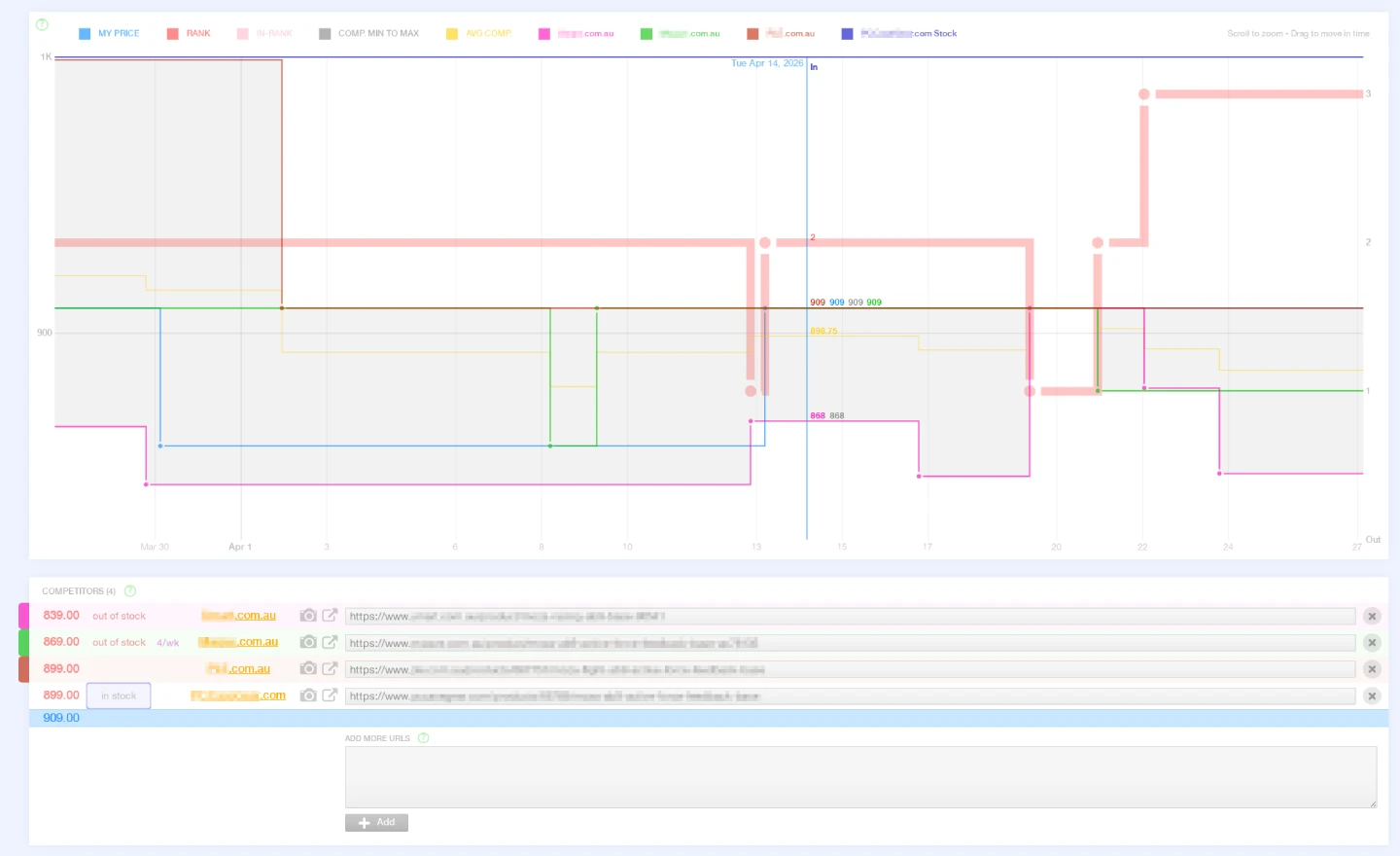
Click the camera icon next to a competitor's price to open a screenshot of the actual product page captured during that visit. You can check what the retailer displayed, even if the price or stock has changed since.
Instead of checking the same retailer pages yourself, explore current and historical prices, stock status and market averages in your dashboard. Turn that data into custom alerts, Excel reports, automatic repricing or workflows using our JSON API.
Based in Santa Monica, California, PriceZag has helped online businesses monitor their competitors since 2016.
Prices and stock, side by side
For each product you follow, PriceZag brings its offers from different retailers into one view, alongside your own price. You can compare the lowest and average competitor prices, see where your offer ranks, and check which sellers actually have stock.
For example, if the cheapest competitor runs out of stock while you still have the product, you may be able to raise your price instead of matching an offer nobody can buy. PriceZag also shows when that competitor has stock again.
- Price: the current selling price detected on each monitored product page, with its original currency recorded.
- Availability: whether a product is in stock or out of stock, when the retailer provides that information.
- Inventory quantity: the number of units available when the website actually reveals a quantity, such as "7 in stock".
- History: how prices and stock readings change over time, shown together in interactive graphs.
Some websites reveal an exact quantity, some say only "In stock", and others provide little usable inventory information. PriceZag keeps those distinctions rather than inventing a stock count. When quantities are available, changes in those quantities can also help produce our competitor sales estimates - an extra way to spot products that may be selling quickly. Brands and distributors can also use these observations for MAP monitoring.
One set of observations, many ways to use it
Collecting prices is only the beginning. Once price and stock data is in PriceZag, you can use it across the platform instead of maintaining your own spreadsheets and scripts just to keep an eye on the market.
| Tool | What it helps you do |
|---|---|
| History graphs | Explore price and stock changes by product, compare retailers' price trends and examine market averages over time. |
| Price and stock alerts | Get notified of price drops, products running out of stock or becoming available again, ranking changes and other conditions you choose. |
| Excel reports | Export current prices, availability, rankings or historical averages for further analysis and sharing. |
| API and automation | Retrieve monitoring data with your own scripts or connect it to the systems you already use. |
| Automatic repricing | Calculate selling prices from competitor offers, stock availability and the pricing rules you set. |
| Competitor sales estimates | Use visible inventory changes to estimate product sales when a retailer reveals useful stock quantities. |
| MAP monitoring | For brands and distributors, follow retailers' advertised prices and investigate possible policy violations. |
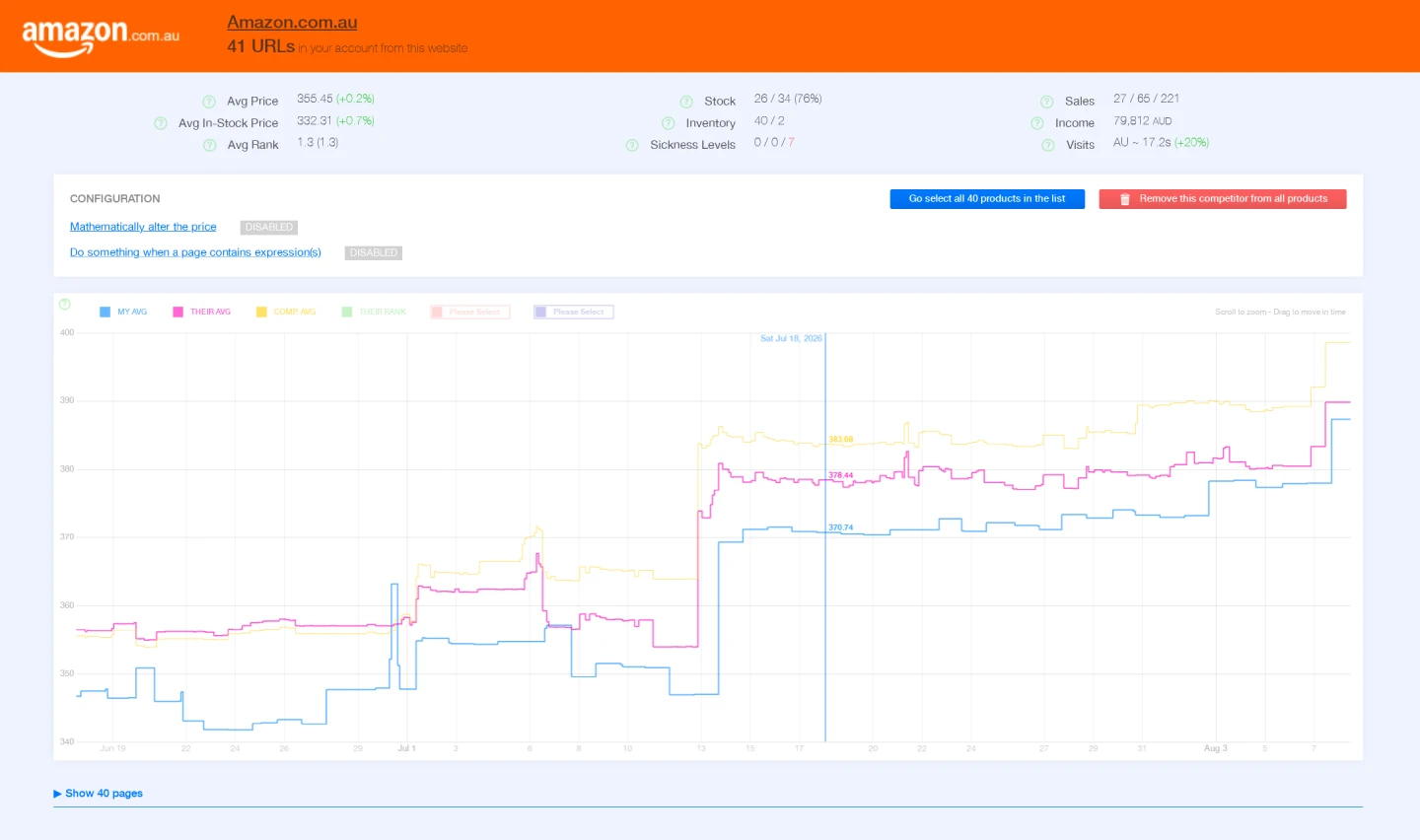
Beyond individual products, the Domains view helps you examine retailers across all the products you monitor from them: average prices, price rankings, availability and trends. You can move between a broad view of a competitor and the history of one particular product.
Start monitoring competitors today!
Track competitors' prices and stock, inspect screenshots of product pages and explore price history. All features included.
When does PriceZag visit each website?
Monitoring is automatic, and visits are scheduled intelligently rather than at fixed times. Standard monitoring is designed around five checks per product URL per day, though actual frequency depends on the plan, the page's history and the conditions of the website.
Our scheduling system pays particular attention to the local business hours of each retailer's market - not PriceZag's business hours in California and not your own time zone. An Australian store and a European store therefore receive their visits at different times of day. Checks are generally concentrated when shoppers in that market are more active.
We also learn from each product's history. Pages whose prices and stock change frequently can receive more attention, while consistently stable pages may be checked less often. Visits are spread smoothly so we are not requesting an entire website's catalog at once. If a website temporarily blocks requests or fails to load, our retry logic adjusts how it is checked.
How PriceZag reads prices from ecommerce websites
PriceZag monitors the actual product pages of online retailers rather than relying on them to send us price lists.
- Load and display each page. Our real graphical browsers run JavaScript and can read content that a simple text download would miss.
- Read and record the results. Our systems identify prices and their original currencies, capture any available stock information and save observations for comparisons over time.
PriceZag also assigns confidence scores to extracted prices and retries pages when a check fails. Saved screenshots help you investigate unusual readings.
Some retailers use website protections that block basic price-tracking tools. Our real browsers and large pool of IP addresses help us monitor many of these protected websites. No service can guarantee access to every page, but handling difficult websites is a major part of what PriceZag does.
Monitor prices across different currencies
Watching retailers in different countries should not mean manually converting every price. PriceZag automatically detects currencies on the pages it visits and supports 170 currencies. Each observed price is stored in its original currency, so the underlying record stays true to what the retailer displayed.
You can choose an Interface Currency in your account settings and change it whenever you like. PriceZag converts amounts for viewing, graphs and reports using the current exchange rate. Your products can even have different currencies for their own selling prices and costs. Historical converted amounts may therefore move slightly with exchange rates even when the retailer's original price has not changed.
Where we visit from matters too. Some stores display different prices, currencies or availability depending on the visitor's location. PriceZag detects the market associated with each website and selects an appropriate visit location from its browser infrastructure in the United States, Australia or United Kingdom. For websites elsewhere, we use the closest suitable option available. This helps us see the pricing and stock information that the retailer normally presents to shoppers in its market.
If a site has unusual geographic or currency behavior, our team can help adjust how that website is visited.
Start tracking without changing your store
You don't need to move your store to another platform or install a special integration just to track other websites. PriceZag monitors the online product pages you select, regardless of which ecommerce platform you use yourself.
- Add your products. Import a spreadsheet, connect a supported store or create products directly in your PriceZag account.
- Add retailer URLs. Associate each product with the pages where competing stores sell that same item.
- Explore the results. Compare prices and stock, inspect the history graph and set up alerts or reports for the decisions that matter to you.
Start with the products you care about most. Try all PriceZag features for 14 days with up to 200 products, no credit card required.
Frequently asked questions
Does PriceZag monitor stock as well as competitor prices?
Yes. We monitor price and product availability together. Where a retailer displays an inventory quantity, we can track that number too. Where only "In stock" or "Out of stock" is shown, we work with the availability information the site provides.
Can I track retailers in other countries and currencies?
Yes. PriceZag supports 170 currencies, automatically detects the currency of monitored prices and lets you view amounts in your chosen interface currency. Our visit locations are selected based on the markets associated with the websites being monitored.
Do I need a specific ecommerce platform to use PriceZag?
No. Competitor price and stock tracking works independently of your store platform because PriceZag monitors the retailers' product pages. Integrations and the API are optional ways to connect the information to your own systems.
Are price updates instant?
No. PriceZag adjusts when each page is checked based on the retailer's market, past changes and website conditions. You see updated information after a successful check.
Can PriceZag monitor websites with anti-bot protection?
PriceZag uses real browsers and a large pool of IP addresses to work with many protected ecommerce websites. Some pages can still be difficult or inaccessible; our system retries failed checks and provides tools for investigating problems. Learn more about monitoring protected websites.